


How to uninstall an Extension
The Joomla! CMS will not let you uninstall Core Extensions.
They are locked.
You can of course uninstall 3rd Party Extensions.
The process is the same for all 3rd Party Extensions (Components, Plugins and Modules).
A word about Packages
Before you attempt to uninstall any Extension, first check to see if it is part of a Package.
Extension developers often bundle Components, Plugins and Modules into a Package.
If you uninstall just one Extension belonging to a Package then problems may later arise.
Instead, uninstall the whole Package.
When you uninstall the Package, then its constituent parts will also be uninstalled (without you having to select them).
Of course, if an Extension is not part of a Package then you can safely uninstall it.
But you still have to be careful because there may still be other related extensions which also need to be uninstalled.
How to identify whether a Package exists
The easiest way to identify if a Package exists is to use the filters at the top of the Manage Extensions screen.
See image below.

Once identified, you can select the check box next to the Package and then the uninstall button.
The Package and its constituent parts will be removed.
The following illustration shows how to uninstall an Extension which is not part of a Package.
Open the Manage Extensions Screen
Select Extensions from the Manage Panel in the System Dashboard.

Select an Extension and Uninstall
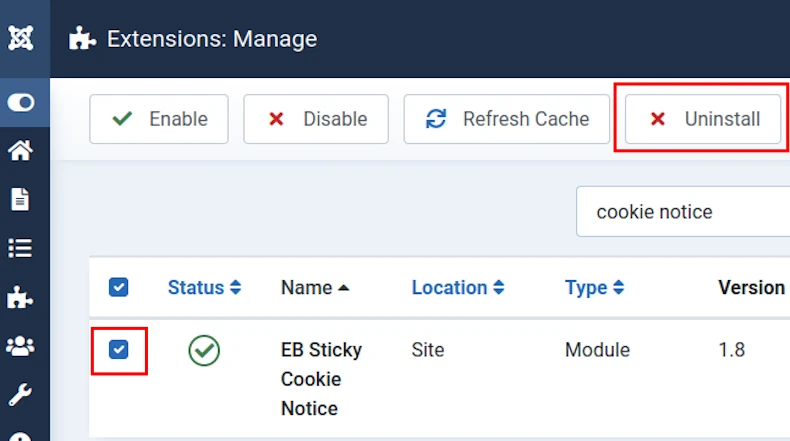
In the Manage Extensions screen, select the check-box next to an extension and then the Uninstall button.
The image below shows a Module about to be uninstalled.
After you have uninstalled an extension
Check that no database tables have been left behind by the uninstallation script.
Also check that no directories and files have been left behind.
If database tables and files have been left behind then they pose a security risk.


