


 An Editor Profile is a specific range of editing options assigned to one or more User Groups allowing for a customized editing experience based on specific need.
For example, one Editor Profile might comprise a few simple editing options for use by a User with Author permissions.
Another Editor Profile might consist of a more complex range of options for use by Users with say Editor permissions.
Users with Publisher, Manager, Administrator and Super User permissions might be assigned an Editor Profile with a full suite of editing options.
Here we focus on working with Editor Profiles in the TinyMCE Editor included with the Core Joomla! CMS.
TinyMCE Editor Profiles
TinyMCE has by default three active Editor Profiles, each assigned to different User Groups.
But you can add more Editor Profiles.
Example: each User Group can have its own Editor Profile if you wish.
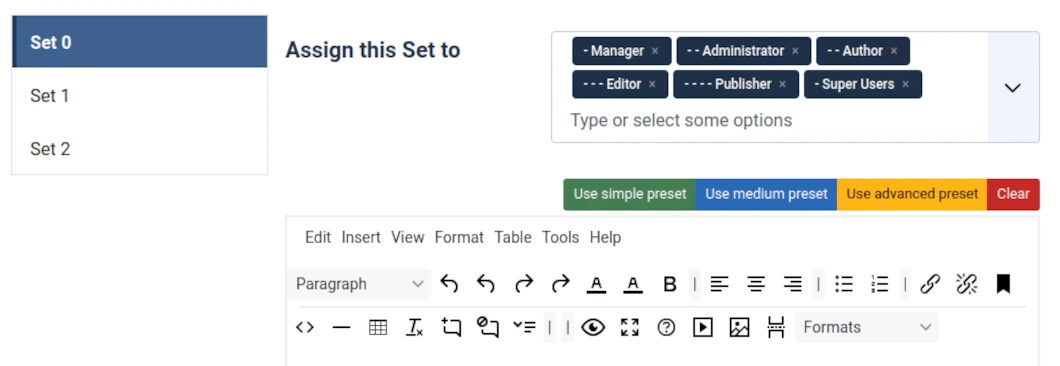
The above image shows the TinyMCE editor panel as configured in a default WYNCHCO Website Design.
Configured? We remove 15 or so infrequently used functions (and their icons) from the editor panel to reduce clutter.
These can be added back any time in the TinyMCE Plugin screen.
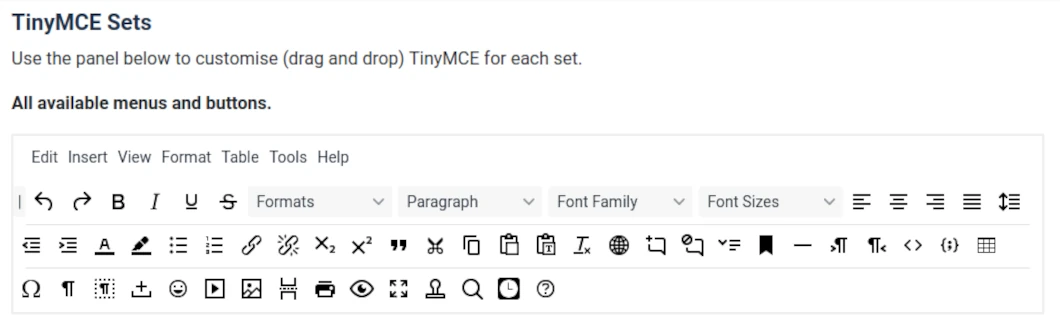
The full set of buttons available for use in the TinyMCE editor panel for any one Editor Profile are as shown in the image below.
JOOMLERS.UK is sponsored by WYNCHCO Solutions
WYNCHCO Solutions help and support managers responsible for Joomla! CMS websites in UK business and third sector organisations across Cheshire, Greater Manchester, Merseyside and North West England.


