


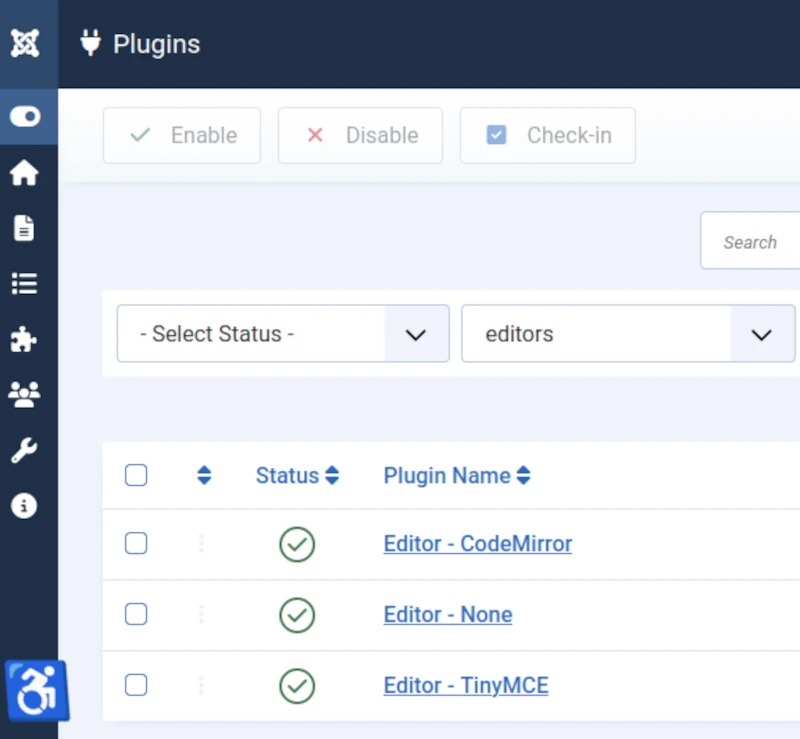
The Core Joomla! CMS includes two Content Editor plugins.
CodeMirror is a simple HTML editor.
TinyMCE is a more sophisticated WYSIWYG editor.
Note: WYSIWYG = What You See Is What You Get.
The Joomla! Extensions Directory also lists a number of alternative content editor extensions created by Third Party developers.
Some of these offer more complex editing options than CodeMirror and TinyMCE.
Example: JCE.
Core Joomla! CMS Editor Plugins
Editor Plugins can be seen when you select the Plugins button in the Site panel of the Home Dashboard.
Select each Plugin in turn to view and edit its settings.
How do the CodeMirror, TinyMCE and JCE Editors compare?
CodeMirror
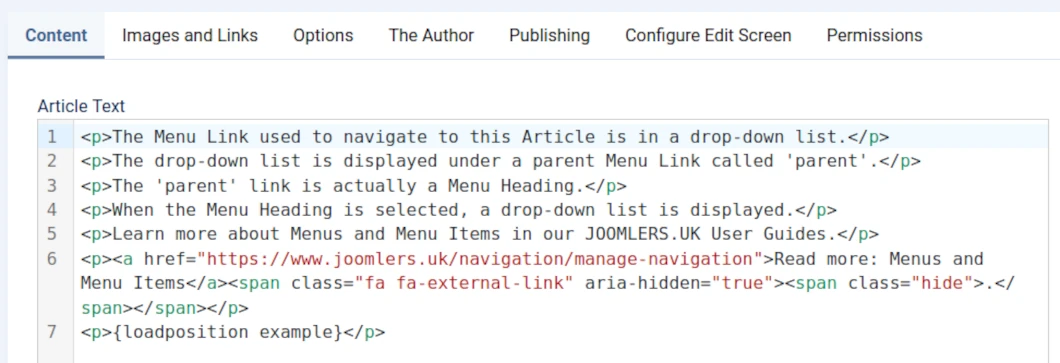
CodeMirror is an HTML editor included with the Core Joomla! CMS.
The image below shows the CodeMirror editor panel.
Top
Bottom

Target Audience
CodeMirror is provided for users who are familiar with and confident using HTML.
HTML = Hyper Text Markup Language.
Verdict
Easy to use.
TinyMCE
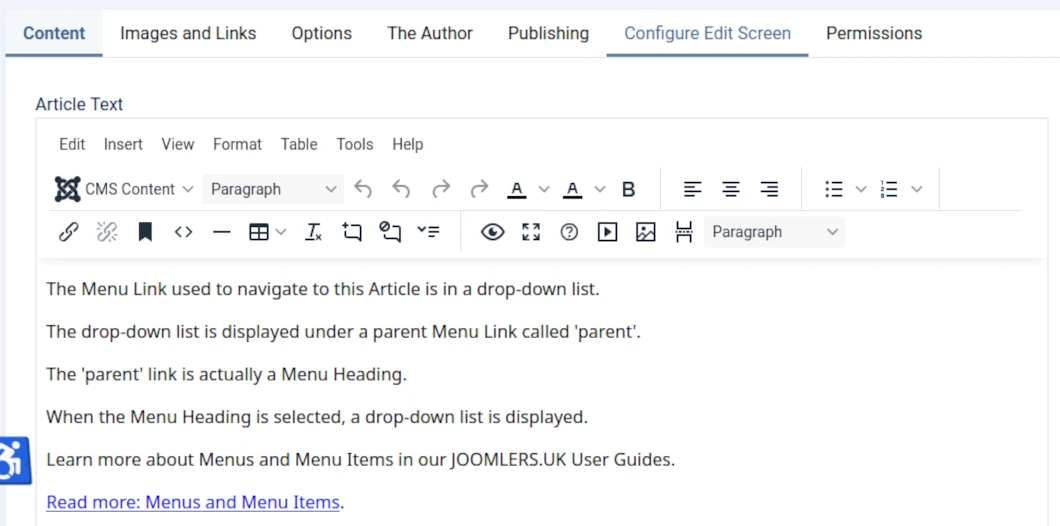
TinyMCE is a WYSIWYG editor included with the Core Joomla! CMS.
WYSIWYG = What You See Is What You Get.
The image below shows the TinyMCE editor panel as configured in a default WYNCHCO Website Design.
Configured? We remove 15 or so infrequently used functions (and their icons) from the editor panel to reduce clutter.
These can be added back any time in the TinyMCE Plugin screen.
Target Audience
TinyMCE is provided for users who are less familiar with and not as confident using HTML.
TinyMCE is quite intuitive but does take some getting used to when you begin using it.
Usefully, it includes a range of Editor Profiles which can be used to simplify the user interface for user groups and even individual users.
Working with Media Files
TinyMCE does not support management of media files from within the editor panel (unlike for example, JCE).
It instead includes a link to the Media screen from where you can select images and insert into articles.
Once inserted into an article, you can delete an image but only from the article.
An image cannot be deleted from the Images folder (and from your website) from within the editor panel.
Instead, you have to search for and delete the image within the Media screen.
TinyMCE does however support Drag and Drop.
By default all images dragged and dropped into articles are stored in the root of the Images folder.
If you want to drag and drop a series of images into a specific folder then this requires that you change the TinyMCE Plugin settings prior to starting work, and then remember to change them back when done.
Verdict
Despite these shortcoming, the TinyMCE Editor is much improved in recent years.
We use it in our own website.
JCE
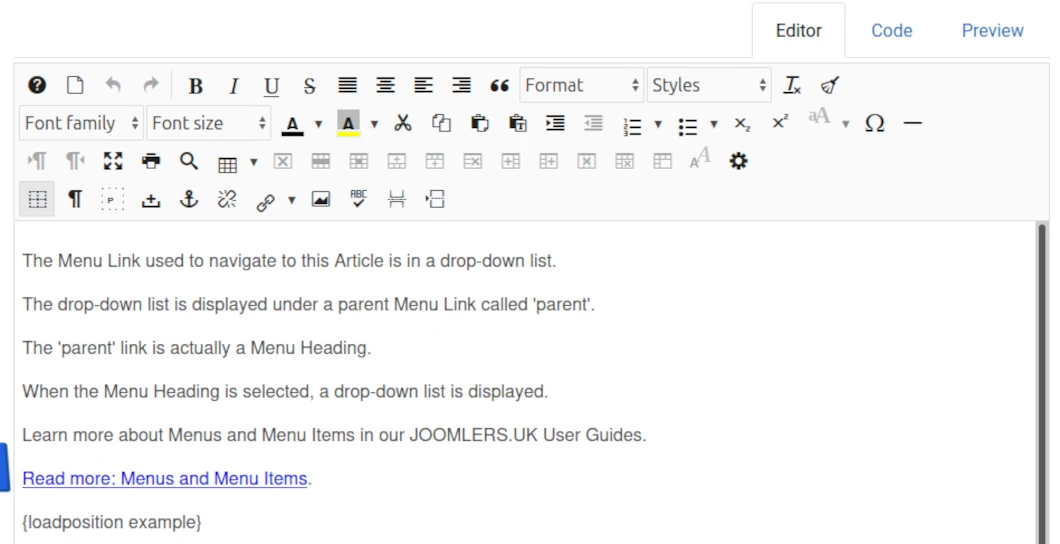
JCE is a Third Party WYSIWYG editor extension not included with the Core Joomla! CMS.
WYSIWYG = What You See Is What You Get.
Like all other Third Party Extensions, it can be downloaded for use in your website from the Joomla! Extensions Directory.
The image below shows the default JCE editor panel.
Top
Bottom

Target Audience
JCE is provided for users who are looking for a more sophisticated editor than TinyMCE.
Like TinyMCE its is quite intuitive but does take some getting used to when you begin using it.
Usefully, it includes a range of Editor Profiles which can be used to simplify the user interface for user groups and even individual users.
Working with Media Files
JCE does support management of media files from within the editor panel (unlike TinyMCE).
JCE also supports Drag and Drop.
As with TinyMCE, by default all images dragged and dropped into articles are stored in the root of the Images folder.
But with JCE you can cut and paste images from one image folder to another from within the content editor.
Verdict
JCE Content Editor is very versatile and as a result very popular with Joomla! CMS users.
We have used it for many years in many different websites.
Caveat
We have however reverted to using TinyMCE in 2026 after a Critical Security Fix was announced.
The developer is very supportive but we will in future install JCE if and when we need the extra utility, use it and then uninstall it when done.
Day to day we can manage fine using TinyMCE.
Useful links
Read more: JCE Developer Website.
JCE Content Editor Video Tutorials.
Simply select Log in when you visit the above Demo link.
Use more than one Content Editor in your website
You can use both TinyMCE and CodeMirror at the same time.
For example, you might assign the TinyMCE to be the global 'default' content editor.
But at the same time assign CodeMirror for use by one or more users with special permissions.
Example: TinyMCE assigned as the global content editor
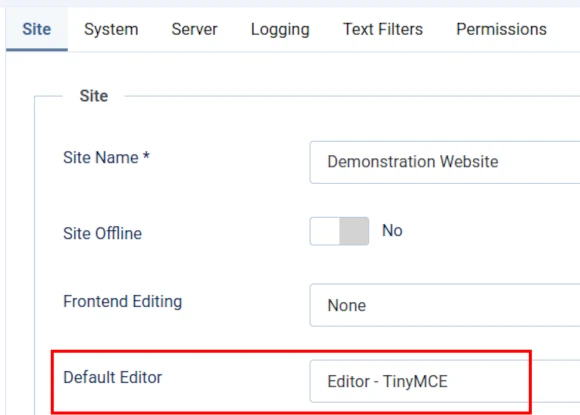
One content editor is assigned as the global editor under the Site tab of the Global Configuration screen in your website Dashboard.
In a WYNCHCO Website Design the global editor by default is TinyMCE.
Image below shows the Site tab of the Global Configuration screen.
Example: CodeMirror assigned to one user
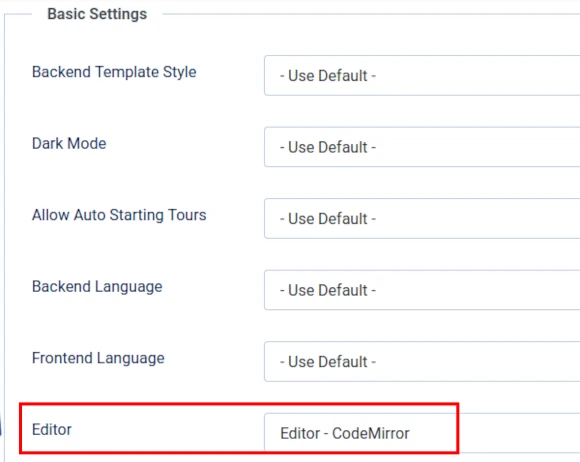
A different content editor may at the same time be assigned to one or more users under the Basic Settings tab of the individual User screen in your website Dashboard.
Image below shows the Basic Settings tab of an individual User screen.
Use a Content Editor in the Front End or Dashboard
Whichever content editor meets your needs, you can use it in the Front End or Dashboard to edit website content.
In the Front End
First sign in using either:
- the Login Module (see image) or
- Sign In Menu Link.
Note:
By default in a WYNCHCO Website Design, both the Login Module and the Sign In menu link are unpublished.
Reason: we recommend editing website content via the website Dashboard.
Image below shows Login Module when published.

After signing in, look for the following buttons.
Click an Edit Article button to begin editing an Article.

Click an un-named button (see below) to begin editing a Custom Module.

Note: if you cannot see the above buttons after signing in then you have not signed in as a user with special permissions.
Check your user status in the User screen of the website Dashboard.
In the Dashboard
After signing into your website's Dashboard, select one of the following buttons from the Site panel:
- Articles.
- Articles & Categories.
- Modules.

JOOMLERS.UK is sponsored by WYNCHCO Solutions
WYNCHCO Solutions help and support managers responsible for Joomla! CMS websites in UK business and third sector organisations across Cheshire, Greater Manchester, Merseyside and North West England.


